
When someone searches for a nearby service on Google, they often check local business listings before visiting a website. They may compare reviews, opening hours, photos, contact details and locations. Your Google Business Profile helps people find this information and decide whether to contact your business. A complete and accurate profile can make that decision easier.
However, simply creating a profile does not guarantee more calls or enquiries. Small mistakes can leave customers confused or make your business look less trustworthy. Incorrect categories, missing services, outdated information and poor review management can all affect the customer experience. If you want to improve your Google Business Profile in Chandigarh, start by understanding these common mistakes and learning how to fix them.
What Is a Google Business Profile?
Google Business Profile is a free tool that allows eligible businesses to manage how they appear on Google Search and Google Maps. Businesses can display important details such as their name, address, phone number, website, opening hours and services. Customers can also view photos, read reviews and find directions to a business.
A well-maintained profile helps people understand what your business offers before they contact you. It can support local discovery, especially when customers search for services in a particular area. However, your profile needs accurate information and regular attention. Simply adding keywords or uploading a few pictures will not guarantee better local rankings.
Why Is Google Business Profile Important for Local Businesses?
Many customers search online before choosing a nearby service provider. For example, someone looking for a dentist, restaurant, salon or digital marketing agency may compare several businesses on Google. A complete profile gives these customers useful information and helps them decide which business suits their needs.
For businesses in Chandigarh, Mohali and Panchkula, local visibility can be valuable. Customers often include a location in their searches or look for services near their current area. An accurate Google Business Profile can help your business appear for relevant local searches. However, visibility also depends on factors such as relevance, distance and prominence. No profile change can guarantee a particular ranking position.
Common Google Business Profile Mistakes That Businesses Should Avoid
Many businesses create their profiles once and rarely check them again. Over time, phone numbers change, services get updated and opening hours become inaccurate. These small issues can create a poor experience for people trying to contact the business.
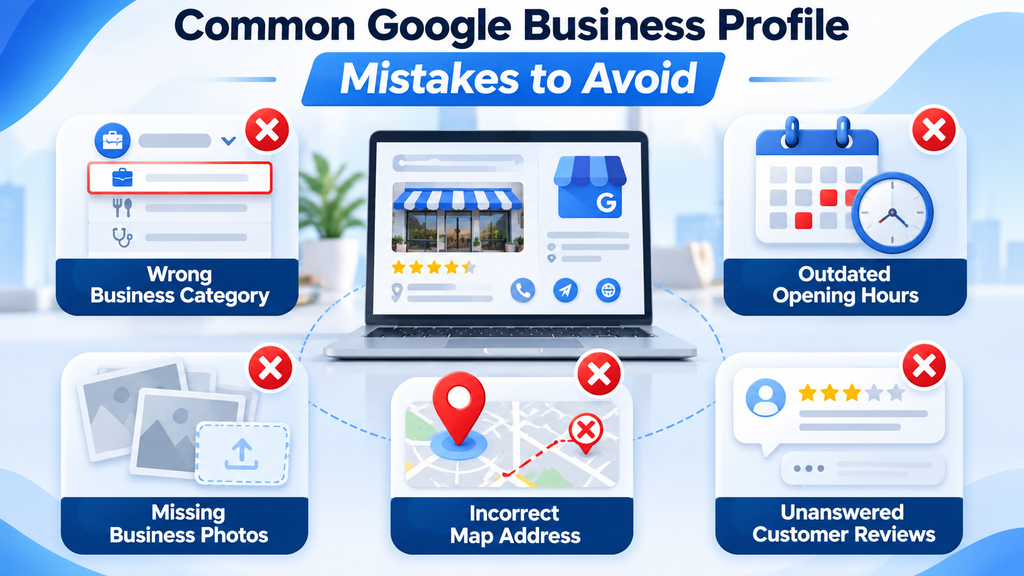
Other mistakes involve incorrect categories, weak descriptions, duplicate listings and poor review management. Some businesses also try to add too many keywords in the business name. This can create policy problems rather than helping local visibility. Understanding these mistakes is the first step towards building a more useful and trustworthy profile.
Using the Wrong Primary Business Category
Your primary category tells Google what your business mainly does. Choosing an unrelated or overly broad category can make your profile less relevant to the searches you want to reach. For example, a business that mainly provides dental treatment should choose the most suitable dental category rather than selecting a general health-related category without checking the available options.
Review the categories available for your business and select the one that best describes your main activity. You can add relevant secondary categories when they genuinely represent other important parts of your business. Avoid adding categories simply to target more keywords. Google recommends choosing the fewest accurate categories needed to describe the business.
Adding Keywords to Your Business Name
Some business owners add location names and service keywords to their Google Business Profile name. They may believe that a name such as “ABC Best Digital Marketing Agency Chandigarh SEO Company” will improve local rankings. However, your profile name should reflect the actual business name used in the real world.
Google’s guidelines do not allow unnecessary keywords or promotional text in the business name. Such changes may lead to edits being rejected or create suspension risks. Keep your real business name consistent across your signage, website and other business materials. Add services, locations and other useful details in their correct profile fields instead.
Keeping Incorrect Address and Service Area Details
An incorrect address can send customers to the wrong location. Even a small mistake in a building number, floor or map pin can create confusion. Businesses should check their complete address and make sure the map marker points to the correct place. If customers visit your premises, your displayed location should accurately represent the real business location.
Service-area businesses need to review their settings as well. If you visit customers instead of receiving them at your office, configure the profile according to Google’s service-area guidelines. Do not use a virtual office or an address where your business does not operate. Accurate location information helps customers understand where you work and whether you serve their area.
Leaving Business Hours Outdated
Opening hours are among the first details customers may check before visiting or calling. If your profile shows that your business is open when it is actually closed, customers may waste time travelling to your location. Incorrect hours can also reduce trust, especially when people experience the same problem more than once.
Review your regular hours and update them whenever your schedule changes. Add special hours for public holidays or temporary changes when the feature is available. Businesses with different timings for different days should enter each schedule carefully. A quick review of your hours can prevent avoidable customer frustration.
Writing a Weak Business Description
Your business description gives customers a short introduction to your services and what makes your business different. A vague description such as “We provide the best services at affordable prices” does not explain much. Visitors need to understand what you offer, who you serve and what kind of work they can expect.
Write a clear description using natural language. Mention your main services, business experience where relevant and the areas you genuinely serve. Avoid repeating the same keyword several times or making claims you cannot support. Google also has content rules for business descriptions, so keep the text useful, accurate and focused on your business rather than promotional offers or website links.
Ignoring Customer Reviews and Questions
Reviews influence how people judge a business before making contact. When customers see unanswered questions or repeated complaints without a response, they may hesitate to choose that business. Ignoring reviews also means missing an opportunity to understand what customers appreciate and where your service needs improvement.
Make time to read new reviews and respond professionally. Thank customers for positive feedback and address genuine complaints politely. Never share private customer information in a public response. Avoid buying reviews, posting fake feedback or offering incentives in exchange for positive ratings. Honest customer feedback creates a more reliable picture of your business.
Uploading Poor-Quality or Irrelevant Photos
Photos help customers understand what your business looks like and what it offers. A restaurant can show its food and seating area, while a salon can display its workspace and services. If a profile contains blurry, outdated or unrelated images, visitors may find it harder to judge the business.
Upload clear and genuine photographs of your location, team, products and work. Keep images well-lit and relevant to the services you provide. Update them when your premises, products or facilities change. Google recommends photos that accurately represent the real business rather than heavily altered or misleading images.
Not Updating Services and Business Information
A business profile should reflect what the company currently offers. If you have added new services but never updated your listing, potential customers may not know about them. Outdated phone numbers, website links and contact details can also prevent people from reaching your business.
Review the profile whenever your business changes. Add relevant services, update contact information and check that your website opens correctly. Remove details that no longer apply. Businesses should also review their profile after changing locations, hours or service arrangements. Accurate information helps customers make decisions with fewer questions.
Creating Duplicate Google Business Profiles
Some businesses accidentally create more than one profile for the same location. This can happen when different employees set up listings or when an old profile remains active after a business creates a new one. Duplicate profiles can confuse customers and create problems with how business information appears across Google Search and Maps.
Check whether your business already has a listing before creating another one. If you find duplicates, review Google’s available guidance for resolving them rather than creating more profiles. Businesses with multiple genuine locations should manage each eligible location correctly. Keep ownership and access organised so that authorised staff can update the right profile.
Ignoring Google Business Profile Posts and Updates
Google Business Profile posts can help businesses share useful updates with customers. You can use them to announce new services, events, seasonal information and other relevant business news. A profile that never shares updates may miss an opportunity to communicate what is happening at the business.
Create posts when you have something useful to share. Use clear images and short descriptions that explain the update. Keep the information accurate and follow Google’s content policies. Posting every day is not a guaranteed ranking method. Focus on giving customers helpful information instead of publishing repetitive content just to appear active.
How to Optimise Your Google Business Profile for Local Searches
Good profile management starts with accurate business information. Make sure your business name, primary category, address or service area, phone number and opening hours are correct. Add a useful description and include the services that genuinely match your business. These details help customers understand what you offer and where they can find you.
You should also maintain your photos, review responses and customer updates. Check the profile regularly for incorrect information or changes that need attention. For businesses targeting Chandigarh, Mohali and Panchkula, mention the locations you genuinely serve in relevant website content and service information. Do not add unrelated locations or repeat city keywords unnaturally.
Google Business Profile vs Website SEO: What Is the Difference?
A Google Business Profile and a business website support different parts of a customer’s search journey. Your profile helps people find local business information through Google Search and Maps. A website gives you more space to explain services, display detailed information, publish articles and collect enquiries.
Both can support a local marketing strategy, but they serve different purposes. A profile does not replace a well-developed website, and a website does not replace accurate business listing information. The following comparison explains their main roles.
| Feature | Google Business Profile | Website SEO |
| Main purpose | Helps customers discover local businesses | Helps pages appear in relevant search results |
| Main platform | Google Search and Maps | Search engines and the website itself |
| Business information | Address, hours, phone and services | Detailed company and service information |
| Customer reviews | Displays Google customer reviews | Can display testimonials and case studies |
| Content | Photos, updates and business details | Blogs, service pages and landing pages |
| Main benefit | Supports local business discovery | Builds broader search visibility and website traffic |
How Often Should You Update Your Google Business Profile?
Your profile needs attention whenever important business information changes. Update your opening hours, contact details, services and location information as soon as necessary. You should also check the profile regularly to make sure customers see the correct information. A monthly review can be a useful routine for many businesses.
Reviews and customer questions may need attention more often. Check for new feedback and respond when appropriate. Add new photos when you have genuine updates to share. There is no fixed posting frequency that guarantees higher rankings. Consistent accuracy and useful information should remain the main priorities.
How ClickMedia Helps Businesses With Google Business Profile Management in Chandigarh
Managing a Google Business Profile involves more than adding a business name and phone number. Businesses need to choose suitable categories, maintain accurate information, manage reviews and keep their profiles aligned with their actual services. Without a clear process, important details can become outdated or inconsistent.
ClickMedia provides digital marketing and local SEO services for businesses in Chandigarh, Mohali and Panchkula. Our services include Google Business Profile management, local SEO, website optimisation, content marketing and online advertising. We help businesses review their online presence and improve the quality of information customers see when searching for their services. Contact ClickMedia to discuss your local marketing requirements and understand which improvements may suit your business.
Frequently Asked Questions About Google Business Profile
What is a Google Business Profile?
Google Business Profile is a free tool that helps eligible businesses manage their information on Google Search and Maps. It allows businesses to display their location, phone number, opening hours, website, photos and other details.
Why is my business not appearing on Google Maps?
Several reasons may explain this. Your profile may be unverified, have incorrect information or face policy restrictions. Local search visibility also depends on relevance, distance and prominence. Review your profile details and check for any notifications or issues in your account.
Does adding keywords to my business name improve rankings?
You should not add keywords that are not part of your real business name. Google requires the name to match how the business is represented in the real world. Add relevant services and location information in their correct fields instead.
How many categories should I add to my Google Business Profile?
Choose the fewest categories that accurately describe your main business activities. Select a specific primary category and add secondary categories only when they genuinely represent your services.
How can I improve my Google Business Profile in Chandigarh?
Start with accurate business information, a suitable category, clear photos and updated opening hours. Add relevant services and respond to customer reviews. Also maintain your website and local SEO content to support your online presence.
Do Google reviews help local businesses?
Reviews help customers understand other people’s experiences with a business. They can also contribute to the prominence signals used in local search. Encourage honest feedback without buying reviews or offering rewards for positive ratings.
Can I create multiple Google Business Profiles for one business?
Google generally expects one profile per business location. Separate profiles may be appropriate for genuine additional locations that meet its eligibility rules. Avoid creating duplicate listings for the same location.
How often should I post on Google Business Profile?
There is no guaranteed posting schedule for better rankings. Share useful updates when you have relevant news, events, services or business information. Keep every post accurate and useful to customers.
Can I manage my Google Business Profile myself?
Yes. Business owners can manage their own profiles through Google. However, businesses with limited time or multiple locations may choose professional help for regular updates, local SEO and review management.
Does ClickMedia provide Google Business Profile management in Chandigarh?
ClickMedia offers Google Business Profile management and local SEO services for businesses in Chandigarh and nearby areas. You can contact the team to discuss your business requirements and available services.
Final Thoughts
Your Google Business Profile can play an important role in helping local customers discover your business. However, a listing with incorrect details, weak photos or unanswered reviews may create a poor first impression. Small improvements can make the profile more useful and help customers understand your services before they contact you.
Start by checking your business name, category, address, hours and contact details. Then review your services, photos and customer feedback. Avoid keyword stuffing, duplicate listings and misleading information. If you need help managing your profile and improving local visibility, ClickMedia can help you plan a suitable Google Business Profile and local SEO strategy for your business.