
A slow website can cost a business more than a few seconds. Visitors may leave before viewing your services, filling out an enquiry form or making a purchase. Website speed also matters for search visibility because Google uses Core Web Vitals as part of its ranking systems. Improving performance can support a better experience for visitors, although speed alone cannot guarantee higher rankings.
For businesses in Chandigarh, Mohali and Panchkula, a website often acts as the first point of contact with potential customers. Someone searching for a digital marketing agency, salon, restaurant or professional service may visit several websites before making a decision. If your website takes too long to load or feels difficult to use, that visitor may choose another business. This is why website speed optimization in Chandigarh should be an important part of your website and SEO strategy.
What Is Website Speed and Why Does It Matter?
Website speed refers to how quickly a web page loads and becomes ready for visitors to use. It includes more than the time needed to display the first part of a page. Visitors also expect images to appear, buttons to respond and menus to work without delay. A website may look attractive, but poor performance can make it difficult to use.
Fast pages help visitors find information without waiting too long. This matters when someone wants to check service details, compare prices or contact a business. A smooth website experience can encourage visitors to explore more pages and take action. However, speed should work alongside useful content, clear navigation and a good website design.
How Website Speed Affects Google Rankings
Google wants to show useful results that meet people’s needs. Website performance is one part of the overall page experience that its ranking systems consider. Google uses Core Web Vitals to measure loading performance, responsiveness and visual stability. These measurements help website owners understand how real visitors experience their pages.
However, a fast website does not automatically rank first on Google. Search rankings depend on many factors, including content quality, relevance, links and competition. Google may still show a relevant page even when its performance is not ideal. Speed improvements should therefore support a wider SEO plan rather than replace keyword research, quality content and technical optimisation.
Understanding Google Core Web Vitals
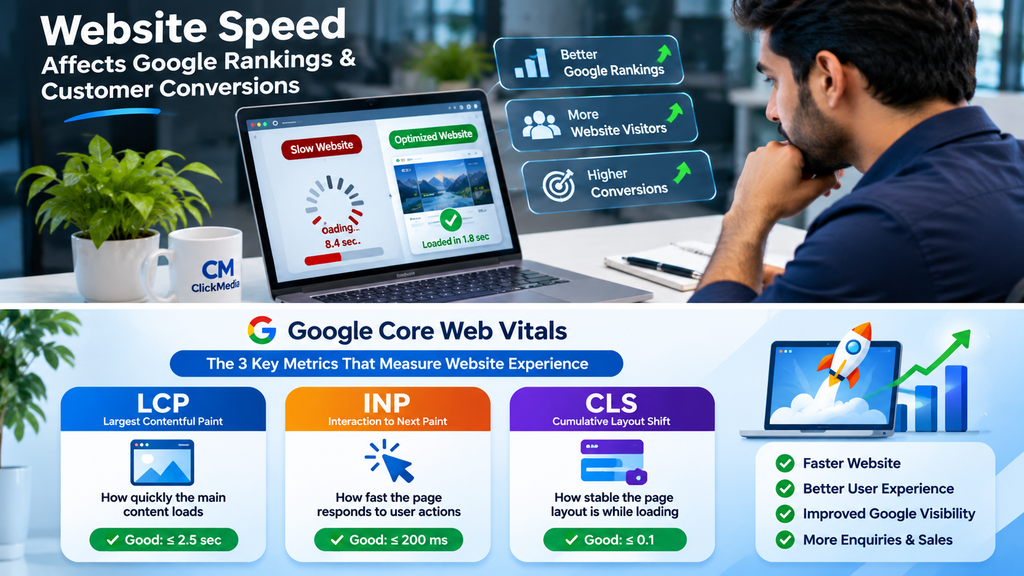
Core Web Vitals are three important measurements that help assess how visitors experience a website. They focus on how quickly the main content appears, how fast the page responds to user actions and whether the layout stays stable while loading. Google recommends achieving good results for all three metrics to support a better user experience.
These measurements are based on real user experiences and can vary between mobile and desktop visitors. Website owners should review their actual performance instead of relying only on how quickly a page loads on their own computer. Google’s recommended good-performance targets are shown below. <Cite refs={[“turn227703search1″,”turn227703search3”]}/>
Largest Contentful Paint (LCP)
Largest Contentful Paint measures how long it takes for the largest visible content element to appear. This may be a banner image, a large heading or another main section of the page. A slow LCP can make visitors feel that the website is taking too long to load, even when smaller parts of the page have already appeared.
Google recommends an LCP time of 2.5 seconds or less for a good user experience. Large images, slow server response and unnecessary scripts can delay this measurement. Optimising the main banner image, improving hosting performance and reducing heavy page elements can help. <Cite refs={[“turn227703search1″,”turn227703search9”]}/>
Interaction to Next Paint (INP)
Interaction to Next Paint measures how quickly a page responds when someone clicks, taps or uses a keyboard. For example, a visitor may click a menu, open a product section or submit an enquiry form. If the website takes too long to respond, the visitor may click again or leave the page.
A good INP score is 200 milliseconds or less. Heavy JavaScript, poorly managed scripts and complex page elements can slow down interactions. Developers can improve responsiveness by reducing unnecessary scripts and making sure important actions receive attention quickly. <Cite refs={[“turn227703search1″,”turn227703search3”]}/>
Cumulative Layout Shift (CLS)
Cumulative Layout Shift measures unexpected movement of page elements while a website loads. You may have seen this happen when a button moves just as you are about to click it. Images without reserved space, late-loading advertisements and changing fonts can cause this problem.
Google recommends a CLS score of 0.1 or less. Developers can reduce unexpected movement by setting image dimensions, reserving space for advertisements and loading page elements in a stable way. A steady layout makes it easier for visitors to read content and use buttons without accidentally selecting something else. <Cite refs={[“turn227703search1″,”turn227703search9”]}/>
How a Slow Website Can Reduce Customer Conversions
Website speed can influence what visitors do after reaching your website. Someone who wants to enquire about a service may leave if the contact page takes too long to open. A shopper may also abandon a product page if images load slowly or the checkout process feels unresponsive. These delays can interrupt the customer’s decision-making process.
A faster website removes some of these obstacles. Visitors can move between pages, read service details and complete forms more easily. This can support better engagement and more opportunities for enquiries or sales. However, conversions also depend on pricing, trust, offers, design and the quality of your services. Speed is one important part of the complete customer experience.
Common Reasons Why Websites Load Slowly
Many websites become slow because they contain too many heavy elements or use resources without proper optimisation. Large images, unnecessary plugins and poorly managed scripts can increase loading time. Sometimes, the hosting server itself may struggle to deliver pages quickly, especially when several visitors access the website at once.
The problem may also come from the website’s theme, page builder or third-party tools. A website with many animations, pop-ups and tracking scripts can become difficult to load on mobile devices. Identifying the actual cause is important before making changes. Installing several speed plugins without checking the problem may create more conflicts instead of improving performance.
How to Improve Website Loading Speed
Improving website speed starts with checking how the pages perform on real devices. A website may load quickly on a powerful office computer but struggle on a basic smartphone or a slower internet connection. Testing important pages separately can help identify which images, scripts or page elements need attention.
Once you know where the problem exists, make changes that address the main causes. Focus on large images, server response, unnecessary plugins and scripts that slow down the page. Avoid making several changes at once without testing the results. A planned approach makes it easier to identify which improvements are working.
Optimise Images and Media Files
Images often take up a large part of a web page’s total size. Uploading very large photographs without resizing or compression can make pages slower, especially on mobile networks. Businesses that use image-heavy galleries, banners and product pages should pay particular attention to media optimisation.
Resize images to match the space where they appear and use modern formats such as WebP or AVIF when supported. Compress files without making them look noticeably worse. You can also use lazy loading for images that appear further down the page. However, the main image visible at the top should be handled carefully so that it does not load late.
Choose Reliable Website Hosting
Your hosting server plays an important role in delivering website content to visitors. Cheap or overloaded hosting may struggle when traffic increases. This can lead to slow page responses, delays and poor performance across different devices.
Choose hosting that suits your website size, traffic and technical requirements. Check server response times, available resources, support quality and backup options before selecting a plan. Businesses with growing websites may need to upgrade their hosting as traffic increases. Moving to a better hosting plan can help, but it should be combined with other performance improvements.
Reduce Unnecessary Plugins and Scripts
Plugins can add useful features to a website, but installing too many can create performance problems. Some plugins load scripts and styles on pages where they are not needed. Others may conflict with your theme or page builder and slow down important functions.
Review the plugins installed on your website and remove those you no longer use. Check whether two plugins provide the same feature. Also review external scripts such as chat tools, tracking codes and social media widgets. Keep the features your business needs, but avoid adding tools without a clear purpose.
Use Browser Caching and Content Delivery Networks
Browser caching allows a visitor’s browser to store certain website files so they do not need to download everything again on every visit. This can make repeat visits faster. Caching also helps reduce repeated requests to the server, depending on how the website is configured.
A Content Delivery Network (CDN) stores copies of selected website files across servers in different locations. Visitors can receive these files from a server closer to them. This may improve delivery speed, especially for websites serving visitors across different regions. The right caching and CDN setup depends on the website’s hosting, content and technical structure.
Website Speed Problems That Often Affect WordPress Websites
WordPress makes it easier for businesses to build and manage websites, but performance still depends on how the site is configured. A heavy theme, oversized images and too many plugins can slow down a WordPress website. Page builders can also add extra scripts and styles, particularly when a page contains many animations or complex sections.
Website owners should review their theme, plugins, image sizes and caching setup. Keep WordPress, themes and plugins updated, but take a backup before making major changes. Test the website after each important update to check that forms, menus and other features still work correctly. A clean setup is often easier to maintain than a website filled with unnecessary add-ons.
Website Speed on Mobile Devices
Many customers visit business websites through their smartphones. They may search for a nearby service while travelling, compare businesses during a break or contact a company directly from a search result. A website that works well on desktop but loads slowly on mobile can lose these visitors before they reach the important information.
Test your pages on different screen sizes and connection speeds. Make sure the main content appears quickly, buttons are easy to tap and forms work properly. Avoid oversized banners and unnecessary pop-ups that cover the screen. Mobile performance should be checked separately because visitors may experience different loading conditions on phones and computers.
Website Speed vs Website Design: Which Matters More?
Website speed and design serve different purposes, but both affect how people use a website. Good design helps visitors understand your services, find important information and recognise your brand. Speed helps them access that information without unnecessary delays. A visually attractive website may still lose visitors if it takes too long to load.
On the other hand, a fast website may not convert well if the design is confusing or the contact details are difficult to find. Businesses should aim for a balance between appearance, performance and usability. The comparison below explains how both areas contribute to a better website experience.
| Website speed | Website design |
| Helps pages load without long delays | Makes information easy to understand |
| Supports smooth page interactions | Guides visitors through the website |
| Reduces waiting during important actions | Builds a consistent brand identity |
| Helps visitors access content on mobile | Makes buttons and menus easier to use |
| Supports good Core Web Vitals | Supports trust and customer engagement |
Tools to Check Your Website Speed
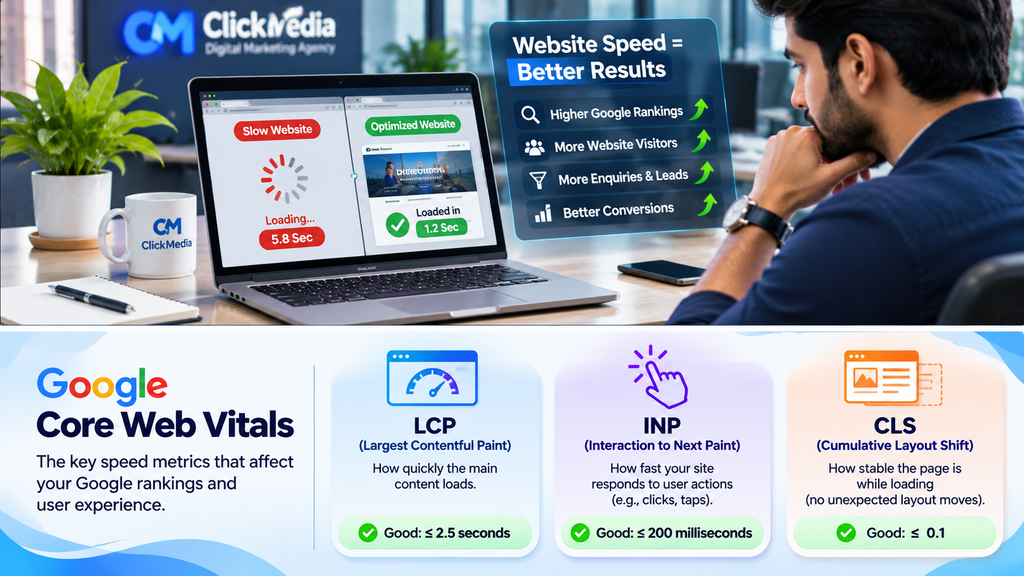
You do not need to guess whether your website is slow. Several tools can help you test performance and identify areas that need improvement. These tools provide information about loading time, page elements, scripts and other technical issues. Testing important pages can help you understand whether the problem affects your whole website or only specific sections.
Google PageSpeed Insights is a useful starting point because it provides both lab results and real-user data when available. Google Search Console also includes a Core Web Vitals report that groups pages according to their performance. Use the findings to decide which issues need attention first rather than trying to achieve a perfect score without understanding the impact. <Cite refs={[“turn227703search6″,”turn227703search3”]}/>
Google PageSpeed Insights
PageSpeed Insights analyses a web page on mobile and desktop. It provides performance scores, Core Web Vitals information when available and suggestions for improvements. You can enter a page URL and review the results to identify issues such as large images, unused resources and slow loading elements.
The tool also helps separate lab data from real-world field data. Lab tests provide a controlled performance check, while field data reflects the experience of actual visitors when enough data is available. Test important pages such as your homepage, service pages and contact page instead of checking only one URL. <Cite refs={[“turn227703search6″,”turn227703search8”]}/>
Google Search Console
Google Search Console helps website owners monitor how their pages perform in Google Search. Its Core Web Vitals report groups URLs into good, needs improvement and poor categories for mobile and desktop. This makes it easier to identify groups of pages that may need attention.
Use the report alongside PageSpeed Insights to understand the problems behind a poor result. Some pages may not have enough real-user data to appear in the report. In those cases, lab testing can still provide useful technical information. Review the reports regularly, especially after major website changes. <Cite refs={[“turn227703search3″,”turn227703search0”]}/>
How ClickMedia Helps Businesses With Website Speed Optimization in Chandigarh
A business website should do more than look attractive. It should load properly, work across devices and make it easy for visitors to contact the business. ClickMedia provides website development, SEO and digital marketing services for businesses in Chandigarh, Mohali and Panchkula. Our approach focuses on website performance, user experience and the business goals behind each website.
We can help businesses review common performance issues, improve website structure and identify areas that may need technical attention. Depending on the website, this may include image optimisation, plugin review, mobile improvements and technical SEO checks. If your website is slow or visitors are not completing enquiries, contact ClickMedia to discuss your requirements and possible improvements.
Frequently Asked Questions About Website Speed and SEO
Does website speed affect Google rankings?
Yes. Google uses Core Web Vitals as part of its ranking systems. However, speed is only one part of the wider search experience. Good performance does not guarantee a top position because Google considers many other factors.
What is a good website loading speed?
There is no single loading-time number that guarantees good rankings. For Core Web Vitals, Google recommends an LCP of 2.5 seconds or less, an INP of 200 milliseconds or less and a CLS score of 0.1 or less.
What are Core Web Vitals?
Core Web Vitals are three measurements of real-world website experience. They cover loading performance, responsiveness and visual stability. The metrics are LCP, INP and CLS.
Can a slow website reduce customer enquiries?
Yes. Long loading times and unresponsive forms can make it harder for visitors to contact a business. Some people may leave before completing an enquiry. Better performance can remove these obstacles, although conversions also depend on other factors.
How can I check my website speed?
You can use Google PageSpeed Insights to test individual pages on mobile and desktop. Google Search Console also provides a Core Web Vitals report when enough real-user data is available.
Does website speed matter on mobile phones?
Yes. Many people browse websites on smartphones, often using mobile networks. A page that loads slowly or has difficult buttons can create a poor experience. Test mobile and desktop performance separately.
Do images make a website slow?
Large and uncompressed images can increase page size and delay loading. Resize images, compress them and use suitable modern formats. Lazy loading can also help with images further down the page.
Can WordPress plugins affect website speed?
Yes. Some plugins add scripts, styles and extra features that affect performance. Review your installed plugins and remove those you do not need. Always test the website after making changes.
Does a high PageSpeed score guarantee better rankings?
No. A high score can point to good technical performance, but it does not guarantee a top Google ranking. Content quality, relevance, links and competition also matter.
Does ClickMedia provide website speed optimization in Chandigarh?
ClickMedia offers website development and SEO services for businesses in Chandigarh and nearby areas. Contact the team to discuss your website performance concerns and the improvements that may be suitable for your site.
Final Thoughts
Website speed affects how visitors experience your business online. Slow pages, delayed buttons and unstable layouts can make it harder for people to explore your services or complete an enquiry. Good Core Web Vitals can support a better page experience and are used by Google’s ranking systems, but they are not a shortcut to the top of search results.
Start by testing your important pages on mobile and desktop. Review large images, hosting, plugins and scripts before making changes. Keep checking performance after updates and focus on improvements that help real visitors. If your business website needs technical attention, ClickMedia can help you review its performance and plan suitable website speed and SEO improvements.